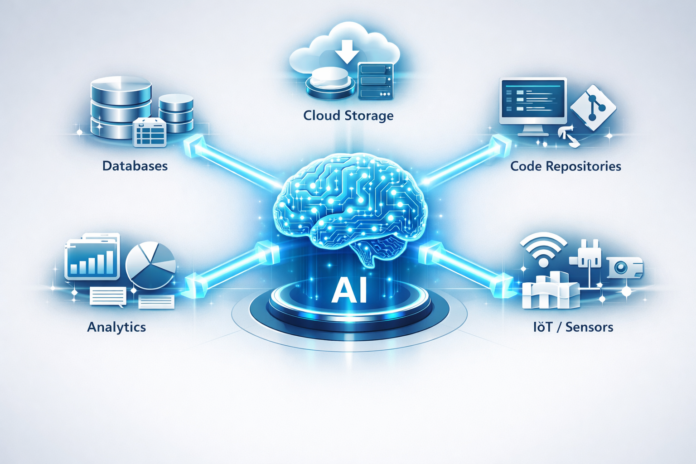
The rapid evolution of Large Language Models (LLMs) has brought us to a critical crossroads. While models have become incredibly intelligent, they often remain “trapped” behind a glass wall, unable to interact seamlessly with the specific, private, or real-time data that users actually care about. Enter the Model Context Protocol (MCP).
As of March 2026, MCP has emerged as the industry standard for connecting AI models to external data sources and tools. Originally introduced by Anthropic and quickly adopted by the broader developer community, MCP solves the “data silo” problem by providing a universal, open-source bridge. Instead of building custom, fragile integrations for every new tool, developers can now use a single protocol to give AI models the context they need to be truly useful.
Key Takeaways
- Standardization: MCP replaces fragmented, custom integrations with a universal standard for AI-to-data communication.
- Security-First: It allows models to access local or secure data without requiring users to upload sensitive files to a central cloud.
- Architecture: The protocol relies on a “Host-Client-Server” relationship, where the server acts as the gateway to specific data.
- Interoperability: A single MCP server can work across multiple AI clients (like Claude Desktop, IDEs, or custom apps), making tools highly portable.
Who This Is For
This guide is designed for software developers looking to build AI-powered applications, enterprise IT leaders seeking to secure their AI data pipeline, and AI enthusiasts who want to understand how the “brain” of an LLM finally gets “hands” to interact with the real world.
1. The Core Problem: Why Do We Need MCP?
Before we dive into the technical specifics, we must understand the frustration that led to MCP’s creation. Traditionally, if you wanted an AI to read your GitHub repository, search your Slack messages, and check your local Postgres database, you had to write three different integrations.
Each integration required:
- Unique API authentication.
- Custom data parsing logic.
- Specific “prompt engineering” to tell the model how to use that data.
This approach was unscalable. As models updated, these custom bridges often broke. Furthermore, for every new AI tool a company adopted, they had to recreate these integrations from scratch. This is what we call the Integration Tax.
The “Stale Context” Problem
Most LLMs are trained on massive datasets, but that data has a “cutoff date.” To make a model useful for work, we use Retrieval-Augmented Generation (RAG) or manual file uploads. However, RAG often involves complex vector databases and “middle-man” layers that can introduce latency and lose nuance. MCP bypasses the middle-man by allowing the model to query the data source directly in real-time.
2. Understanding the MCP Architecture
MCP is built on a very specific hierarchy that ensures security and flexibility. To understand the role of MCP, you must understand the three primary players in the ecosystem:
A. The MCP Host
The Host is the environment where the AI model actually lives and breathes. This is the application the user interacts with.
- Examples: Claude Desktop, a VS Code extension, or a custom-built enterprise AI portal.
- Role: The host is responsible for managing security permissions and deciding which “Servers” the AI is allowed to talk to.
B. The MCP Client
The Client sits inside the Host. It is the component that initiates the connection to the data. It follows the MCP specification to “ask” the server what capabilities it has.
- Role: It translates the AI model’s intent into a protocol-compliant request and handles the response from the data source.
C. The MCP Server
The Server is the most critical part for developers. It is a small, lightweight program that “exposes” specific data or functionality.
- Examples: A server that connects to the Google Drive API, a server that reads local Markdown files, or a server that can execute terminal commands.
- Role: It acts as the translator between the universal MCP language and the specific language of the data source (e.g., SQL, REST, or GraphQL).
3. The Three Pillars of MCP: Resources, Tools, and Prompts
When an AI model connects to an MCP Server, it doesn’t just see a wall of text. The protocol organizes information into three distinct categories, which allow the model to understand how to interact with the information.
Resources: The “Read-Only” Data
Resources are like the files or documentation of the AI world. They provide context that the model can read but not necessarily change.
- Example: An MCP server for a legal firm might expose “Case_Files” as a resource. The AI can pull the text of these files to summarize them.
- Real-world use: Reading logs, inspecting database schemas, or browsing documentation.
Tools: The “Action” Layer
Tools allow the AI to do things. These are executable functions that have side effects.
- Example: A Slack MCP server might have a tool called send_message. When the user asks the AI to “Tell the team I’m running late,” the AI uses this tool to actually send the text.
- Real-world use: Deploying code, updating a Jira ticket, or calculating a complex financial formula.
Prompts: The “Template” Layer
Prompts in MCP are pre-defined templates that help the model understand how to perform specific, repetitive tasks.
- Example: A “Code Review” prompt that tells the model exactly what to look for when it accesses a file resource.
- Real-world use: Standardizing company reporting, automating daily stand-up summaries, or guiding the AI through a specific troubleshooting workflow.
4. Technical Implementation: How MCP Communicates
At its heart, MCP is a transport-agnostic protocol. This means it doesn’t care how the bits get from point A to point B, as long as they follow the rules. However, in 2026, two primary transport methods have become the standard:
JSON-RPC 2.0
MCP uses JSON-RPC as its messaging format. This is a simple, lightweight way for a client to tell a server, “Please run this function with these parameters.” Because it is standard JSON, it is easy to debug and works with almost every programming language.
Transport Mechanisms
- Stdio (Standard Input/Output): This is the most common for local setups. The Host starts the Server as a child process and talks to it through the command line. This is incredibly secure because the data never leaves your machine.
- SSE (Server-Sent Events): This is used for remote servers. It allows a web-based MCP server to “push” data to the client over an HTTP connection.
5. Why MCP is a Game-Changer for Security
One of the biggest hurdles for enterprise AI adoption has been security. Companies are rightfully terrified of sending their proprietary source code or customer data to a third-party LLM provider to be used for training.
MCP flips the security model.
Instead of sending your data to the model, MCP brings the context to the model’s current session.
- Local Control: If you use an MCP server running on stdio, the data stays on your local hardware. The AI model only sees the specific snippet of data it needs to answer your current question.
- Granular Permissions: The Host application (like Claude) can ask the user for permission before an MCP server executes a tool. For example: “The GitHub server wants to delete a branch. Allow?”
- No Training Leakage: Because the data is provided as “context” in the message history rather than being part of the model’s weights, it isn’t “learned” by the model in a way that could leak to other users.
6. MCP vs. RAG: Which One Should You Use?
It’s easy to confuse MCP with Retrieval-Augmented Generation (RAG). While they both provide context to an LLM, they serve different purposes.
| Feature | RAG (Retrieval-Augmented Gen) | MCP (Model Context Protocol) |
| Data Source | Usually a Vector Database | Live APIs, Databases, Local Files |
| Data Freshness | Depends on “Embedding” frequency | Real-time / Live |
| Complexity | High (Requires ETL, Embeddings) | Low (Direct API connection) |
| Interactivity | Read-only mostly | Read, Write, and Execute (Tools) |
| Best For | Searching millions of documents | Interacting with specific tools/data |
The Verdict: In 2026, most advanced systems use both. RAG is used to find which document is relevant, and MCP is used to interact with that document or the systems related to it.
7. Step-by-Step: How to Build Your First MCP Server
Building an MCP server is surprisingly simple, thanks to the SDKs provided in Python and TypeScript. Here is the conceptual flow of creating a server that shares your local “To-Do” list with an AI.
Step 1: Initialize the Server
Using the TypeScript SDK, you create a new Server object. You give it a name and a version.
Step 2: Define Your Resources
You tell the server: “I have a resource called todo-list. When requested, read the file tasks.txt and return the string.”
Step 3: Define Your Tools
You add a tool called add-task. You define that it needs one input: task_name (a string). You write the JavaScript code to append that string to your tasks.txt file.
Step 4: Choose Your Transport
For a local app, you’ll likely use StdioServerTransport. This allows your AI Desktop app to launch the script whenever you start a chat.
Step 5: Configure the Host
In your AI application (like Claude Desktop), you edit a configuration file (usually a .json file) to point to the location of your new script.
8. Real-World Use Cases for MCP
To truly appreciate the role of Model Context Protocol, we have to look at how it’s being used in the wild in 2026.
Software Engineering
A developer is working on a complex legacy codebase. Instead of copy-pasting code into a chat, they use a GitHub MCP Server. The AI can search the repository, look at specific commits, and even run the local test suite via a Terminal MCP Server. If a test fails, the AI sees the error in real-time and suggests a fix.
Financial Analysis
An analyst needs to compare this morning’s market data with a client’s portfolio. They use a Google Sheets MCP Server to read the portfolio and a Bloomberg MCP Server to fetch live prices. The AI performs the calculation and generates a PDF report using a FileSystem MCP Server.
Research and Academic Writing
A researcher uses a Zotero MCP Server to access their library of 500+ PDFs. They can ask the AI, “Which of my saved papers mention the ‘Kessler Syndrome’?” The AI pulls the specific snippets from those papers and cites them accurately.
9. Common Mistakes When Implementing MCP
Even though MCP simplifies things, there are several pitfalls that developers often fall into.
- Over-Exposing Data: Giving an MCP server access to your entire root directory (/) is a massive security risk. Always scope your servers to the specific folder or API they need.
- Ignoring Latency: If an MCP server takes 30 seconds to query a slow database, the AI model may time out. Use caching or optimized queries within your server logic.
- Vague Tool Descriptions: The AI decides which tool to use based on the description you provide. If you have a tool called update but don’t explain what it updates, the AI will hallucinate or fail to use it. Be verbose in your descriptions.
- Forgetting Error Handling: If a tool fails (e.g., a “File Not Found” error), your MCP server must return a clear error message. If it just crashes, the AI won’t know how to explain the problem to the user.
10. The Future of MCP: What’s Next?
The Model Context Protocol is currently in its “Browser Wars” phase. Just as early web browsers struggled with different standards before settling on HTML5, AI companies are realizing that a fragmented ecosystem helps no one.
The Rise of the “MCP Marketplaces”
We are already seeing the emergence of marketplaces where developers can download pre-built MCP servers for every imaginable service—from Spotify to AWS. This “plug-and-play” nature will make AI assistants infinitely more capable.
Multi-Agent Orchestration
As MCP matures, we will see “Agentic Workflows” where one AI (the orchestrator) uses MCP to talk to other specialized AI agents. For example, a “Manager Agent” might use an MCP server to delegate a coding task to a “Coder Agent” and a testing task to a “QA Agent.”
Conclusion
The Model Context Protocol represents a fundamental shift in how we interact with artificial intelligence. We are moving away from the era of “Chatbots” that merely talk, and into the era of “AI Agents” that actually work.
By standardizing the way context is delivered to a model, MCP removes the friction that has held back enterprise AI for years. It prioritizes developer experience, user security, and system interoperability. Whether you are a solo developer building a niche tool or a CTO architecting a global data strategy, understanding and implementing MCP is no longer optional—it is the prerequisite for building the next generation of intelligent software.
The wall between the AI’s intelligence and your data has finally been breached. The question is no longer “What does the model know?” but rather “What can you empower the model to do?”
Next Steps:
- For Developers: Download the MCP SDK and try building a simple “Hello World” server that reads a local text file.
- For Businesses: Audit your current AI integrations and identify where a standardized protocol could reduce your technical debt and improve data security.
FAQs
1. Is MCP only for Anthropic’s Claude?
While Anthropic spearheaded the development and release of MCP, it is an open-source protocol. It is designed to be model-agnostic. In 2026, many other LLM providers and IDEs have adopted MCP to allow their models to use the same ecosystem of servers.
2. Does using MCP cost extra money?
MCP itself is a free, open-source standard. However, the “Servers” you connect to might have their own costs (e.g., a GitHub API may require a paid subscription, or a cloud-hosted MCP server may charge for compute time).
3. Is MCP a replacement for fine-tuning?
Yes, in many cases. Fine-tuning is used to teach a model how to speak or to give it “static” knowledge. MCP is for giving a model “dynamic” or “private” knowledge. For most business applications, MCP is faster, cheaper, and more effective than constant fine-tuning.
4. Can I run MCP servers on my phone?
Currently, MCP is primarily designed for desktop and server environments (using Stdio or SSE). However, as mobile AI “wrappers” become more sophisticated, we are seeing early implementations of MCP-like structures for mobile OS data access.
5. What programming languages support MCP?
Official SDKs are currently most mature in TypeScript/JavaScript and Python. However, because the protocol uses JSON-RPC, you can implement an MCP server in any language that can handle JSON and standard I/O (like Go, Rust, or C#).
References
- Anthropic Official Documentation: Model Context Protocol Introduction (2024).
- MCP GitHub Repository: The Open Source Specification and SDKs.
- JSON-RPC 2.0 Specification: Official Standard for MCP Messaging.
- Vercel AI SDK: Integrations with Model Context Protocol.
- IEEE Xplore: “Standardization in Large Language Model Tool-Use” (Academic Paper, 2025).
- “AI Infrastructure in 2026”: Report by Gartner on the adoption of standardized AI protocols.
- Cloudflare Blog: “Scaling MCP Servers with Serverless Architecture.”
- Python Software Foundation: “Building AI-Native Applications with Python and MCP.”