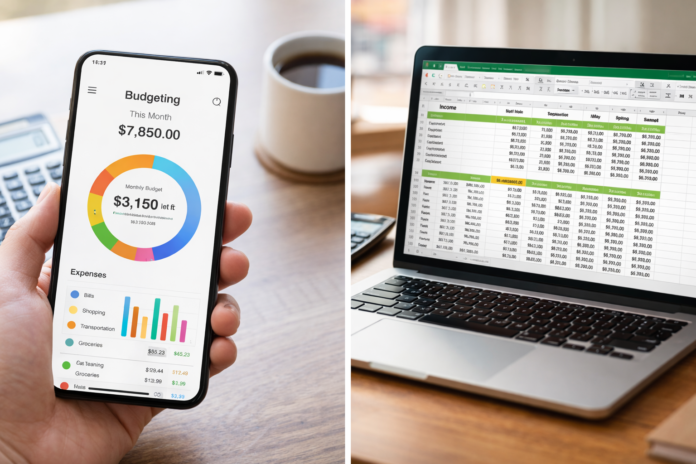
Managing your money is one of the most personal habits you can develop. Like a diet or an exercise routine, the “best” method isn’t necessarily the one with the most features—it’s the one you will actually stick to. In the modern financial landscape, the battle for your attention is primarily fought between two heavyweights: the automated convenience of budgeting apps and the granular control of spreadsheets.
As of February 2026, the gap between these two has narrowed. Apps have become more customizable, and spreadsheets have become smarter with automated data feeds. Yet, the core philosophy remains distinct. One offers a “set it and forget it” guardrail for your finances; the other offers a blank canvas for total control.
This guide goes beyond a simple feature list. We will explore the psychological, security, and lifestyle implications of both methods to help you decide which tool deserves to be the operating system for your financial life.
Key Takeaways
- Budgeting Apps prioritize speed, automation, and user experience (UX). They are best for people who want quick insights and mobile access.
- Spreadsheets prioritize privacy, customization, and cost-effectiveness. They are ideal for those who want to “feel” their numbers and require complex forecasting.
- The “Hybrid” Method is rising in popularity, combining the data aggregation of apps with the analysis power of spreadsheets.
- Security varies significantly: Apps rely on bank-grade encryption and third-party aggregators (like Plaid), while local spreadsheets rely on your device’s security.
Who This Article Is For
- The “Mint Refugee”: Former users of discontinued apps looking for a new home.
- The Data Analyst: Someone who loves pivot tables and trusts their own math over an algorithm.
- The Busy Parent: Someone who needs to see their “Safe to Spend” number while standing in the grocery line.
- The Privacy Advocate: Anyone uncomfortable with sharing bank login credentials with third-party software.
1. The Case for Budgeting Apps: Automation and Accessibility
Budgeting apps (like YNAB, Monarch Money, Copilot, and PocketGuard) are designed to reduce friction. The philosophy here is simple: if budgeting is hard, you won’t do it. By automating the tedious parts of money management, these apps aim to keep you engaged through gamification, alerts, and beautiful visualizations.
The “Day in the Life” of an App User
Imagine you buy a coffee. Before you even leave the shop, your phone buzzes. It’s your budgeting app categorizing the transaction as “Dining Out” and showing you that you have $15 left in that category for the week. You didn’t have to log anything; the feedback loop was instant.
Core Advantages
- Bank Syncing: The ability to pull transactions automatically from credit cards, checking accounts, and investment portfolios is the single biggest selling point. It eliminates data entry errors and saves hours of time.
- Proactive Alerts: Apps can warn you if a subscription price increases, if you’re approaching an overdraft, or if you’ve exceeded a category limit before the month ends.
- Mobile-First Design: These tools are built for the screen in your pocket. Checking your budget becomes as easy as checking Instagram.
- Partner Syncing: For couples, apps like Honeydue or Monarch allow two people to view joint finances from separate devices without sharing a single login credential.
The Downsides
- The “Check-Out” Effect: Because the app handles everything, it is easy to become passive. You might glance at the numbers without truly processing them, leading to a disconnect from your spending pain.
- Subscription Fatigue: Most premium budgeting apps now run on a subscription model (SaaS), costing anywhere from $5 to $15 per month.
- Categorization Errors: AI is getting better, but it’s not perfect. A purchase at a gas station might be categorized as “Fuel” when you actually bought snacks (Groceries), requiring manual correction.
2. The Case for Spreadsheets: Control and Privacy
Spreadsheets (Microsoft Excel, Google Sheets, LibreOffice) are the “manual transmission” of the financial world. They require more skill to drive, but they give you total control over the vehicle. For many, the act of building the budget is where the value lies.
The “Day in the Life” of a Spreadsheet User
You buy a coffee. You keep the receipt or make a mental note. On Friday morning, you sit down with your coffee and open your “2026 Master Budget.” You manually enter your expenses from the week. As you type “-$4.50” for the coffee, you physically feel the money leaving your account. You notice your “Dining” cell turn yellow (conditional formatting you set up) warning you that you are close to your limit. You adjust your weekend plans accordingly.
Core Advantages
- Infinite Customization: Do you want to track your net worth in Bitcoin, your kid’s allowance, and your vegetable garden expenses in one view? A spreadsheet can do that. You are not limited by the developer’s roadmap.
- Privacy & Sovereignty: If you use a local Excel file, your financial data lives on your hard drive. No third-party aggregator sees your transactions. You are not the product; you are the owner.
- Mathematical Transparency: In an app, a “Net Worth” number is a black box. In a spreadsheet, you can click the cell and see exactly which formula calculated that number. You know it is correct because you built it.
- Cost: Google Sheets is free. Excel is likely already on your work computer. There are no recurring monthly fees for the software itself.
The Downsides
- High Friction: The need to manually import data (or download CSV files from your bank) is the number one reason people quit spreadsheets.
- Broken Formulas: One accidental keystroke can break a complex chain of formulas, leading to frustrating troubleshooting sessions.
- Mobile Clunkiness: While Google Sheets has an app, navigating a 50-column spreadsheet on an iPhone is a miserable experience.
3. Comparison Factors: Deep Dive
To help you choose, let’s break down the four critical factors that usually drive the decision.
Cost Analysis
- Apps: Most robust apps follow a subscription model. As of 2026, you can expect to pay between $60 and $120 annually. Free apps often exist (like the basic version of EveryDollar), but they usually gate the essential features (like bank syncing) behind a paywall.
- Spreadsheets: Google Sheets is 100% free. Microsoft Excel requires a Microsoft 365 subscription (approx. $70/year), but most users already have this for work or school. Templates can be found for free or purchased for a one-time fee of $10-$50.
Security and Data Privacy
This is a massive differentiator.
- Apps: Budgeting apps use data aggregators like Plaid, MX, or Yodlee. These intermediaries connect to your bank using OAuth tokens (meaning they don’t store your actual password). The data is encrypted with 256-bit encryption. However, data breaches at the aggregator level are a theoretical risk. Furthermore, some “free” apps monetize by selling anonymized aggregate data to marketers.
- Spreadsheets: The security is entirely up to you. A Google Sheet is as secure as your Google Account (enable 2-Factor Authentication!). A local Excel file on an encrypted hard drive is perhaps the most secure digital option available, short of an air-gapped computer.
The Learning Curve
- Apps: Low to Medium. Apps like Simplifi are “plug and play.” However, strict methodology apps like YNAB (You Need A Budget) have a steep learning curve because they force you to learn a specific philosophy (Zero-Based Budgeting) alongside the software.
- Spreadsheets: Medium to High. You need to understand basic formulas (=SUM, =IF). If you want to build a dashboard, you’ll need to learn Pivot Tables or VLOOKUP/XLOOKUP.
Psychological Impact: Mindfulness vs. Convenience
This is often overlooked. Manual entry is a feature, not a bug. Psychologists and behavioral economists suggest that the “pain of paying” is reduced when we use credit cards and automated apps. Manually typing a transaction forces you to confront the spending. If you are trying to break a spending addiction, the friction of a spreadsheet is actually helpful. If you are just trying to monitor a healthy cash flow, the friction is an annoyance.
4. Which Option Suits Your Lifestyle?
We can segment the “correct” choice based on specific lifestyle archetypes. Find the one that resonates with you.
1. The “Busy Professional” or “Chaos Manager”
Recommendation: Premium Budgeting App (e.g., Copilot, Monarch) You have a high income but zero time. You have 401ks, a mortgage, daycare costs, and multiple credit cards. You need a dashboard that tells you “Yes” or “No” on spending in 5 seconds. You are willing to pay $100/year to save 5 hours of work a month.
2. The “Debt Destroyer”
Recommendation: Manual Spreadsheet or YNAB You are in crisis mode or aggressive payoff mode. You need to account for every single penny. Automation is dangerous for you because it allows you to ignore small leaks. The act of manually entering transactions keeps you honest and keeps your goals top-of-mind.
3. The “Privacy Maximalist”
Recommendation: Local Excel / LibreOffice You read the Terms of Service. You don’t like the idea of a startup having a map of your entire financial life. You prefer to download .CSV files from your bank once a month and clean the data yourself. You value sovereignty over convenience.
4. The “Couple with Shared Expenses”
Recommendation: App with “Partner Mode” (e.g., Honeydue, Zeta) Spreadsheets are notoriously bad at collaboration (unless you use Google Sheets, but even then, version control can be messy). Apps designed for couples allow you to split transactions, comment on specific charges (“What is this Amazon charge?”), and view joint goals without merging every single bank account.
5. The “Control Freak” (Affectionate)
Recommendation: Tiller (The Hybrid) There is a third path. Services like Tiller link to your bank accounts (like an app) but feed the raw data directly into a Google Sheet or Excel file. This gives you the automation of an app with the infinite customizability of a spreadsheet. It is the best of both worlds for the power user.
5. Common Mistakes to Avoid
Regardless of which tool you choose, these pitfalls can derail your financial progress.
Mistake #1: “Set it and Forget it” (Apps)
The danger of automation is apathy. Users often sync their accounts, set up categories, and then never look at the app until they get an “Overdraft Alert.”
- Fix: Schedule a “Money Date” with yourself or your partner once a week to review the automated data.
Mistake #2: Breaking the Formulas (Spreadsheets)
You try to add a row for “Pet Insurance,” and suddenly your “Total Monthly Expenses” cell reads #REF!.
- Fix: Always keep a “Master Copy” of your blank template saved separately. If you break your working sheet, you can reference the master to fix the formula.
Mistake #3: Tracking Too Much Detail
Do you really need to split a Target receipt into “Groceries,” “Clothing,” “Home Goods,” and “Personal Care”?
- Fix: Start with broad categories. If tracking is too tedious (especially in spreadsheets), you will quit. “Shopping” is a perfectly valid category if it keeps you consistent.
Mistake #4: Ignoring Irregular Expenses
Most budgets fail because of the “non-monthly” bills: car registration, Christmas gifts, annual insurance premiums.
- Fix: Whether using an app or a sheet, create a “Sinking Fund” category. Divide the annual cost by 12 and “save” that amount monthly.
6. Conclusion: The Best Tool is the One You Use
The debate between budgeting apps and spreadsheets is not about software; it is about behavior.
If you value efficiency, modern interface, and real-time data, an app is your lifestyle match. It acts as a GPS, constantly recalculating your route based on traffic (spending).
If you value privacy, total control, and a tactile relationship with your money, a spreadsheet is your match. It acts as a paper map—it requires you to pay attention to the road, but you will never lose your sense of direction.
Your Next Step: Don’t overanalyze for weeks.
- If you lean towards apps: Download the free trial of Monarch Money or YNAB today. Connect one account and try it for 3 days.
- If you lean towards spreadsheets: Open Google Sheets and search for the “Annual Budget” template (it’s free and pre-installed). Enter your last month’s income and fixed expenses.
Action beats perfection. Pick one and start tracking.
7. Frequently Asked Questions (FAQs)
Q: Are budgeting apps safe to link to my bank account? A: generally, yes. Most reputable apps (like YNAB, Monarch, Simplifi) do not store your bank login credentials directly. They use third-party data aggregators like Plaid or MX, which are held to bank-grade security standards (SOC 2 compliance and 256-bit encryption). However, using any online service carries a non-zero risk. If security is your top priority, use a local spreadsheet.
Q: Can I use Excel for budgeting if I’m not good at math? A: Absolutely. You do not need to be a math whiz. Most budgeting templates do the math for you. You only need to know how to enter numbers into cells. If you download a pre-made template, the formulas (like summing up your total expenses) are already built-in.
Q: Is it worth paying for a budgeting app when spreadsheets are free? A: It is worth it if the paid app saves you time or money. If paying $100 a year helps you save $1,000 by catching unwanted subscriptions or curbing dining habits, the ROI (Return on Investment) is positive. If you pay for the app and ignore it, a free spreadsheet is a better option.
Q: What is the “Zero-Based Budgeting” method mentioned with apps like YNAB? A: Zero-Based Budgeting is a philosophy where you assign every single dollar you earn a specific job (Rent, Groceries, Savings) until you have $0 left to budget. It forces you to be intentional with your money. While YNAB is famous for this, you can also build a zero-based budget in a spreadsheet.
Q: Can I import my bank data into a spreadsheet automatically? A: Yes, but usually not for free. Tools like Tiller Money can automatically feed your bank transactions into Google Sheets or Excel daily. This is a popular “hybrid” solution that costs a monthly or annual fee.
Q: Which option is better for freelancers with irregular income? A: Spreadsheets often win here due to flexibility. Most apps assume a steady monthly paycheck. With a spreadsheet, you can easily create columns for “Low Income Month” vs “High Income Month” scenarios to smooth out your cash flow planning.
8. References
- Federal Trade Commission (FTC). “Budgeting: How to Create a Budget.” Consumer.gov. https://consumer.gov/managing-your-money/making-budget
- Consumer Financial Protection Bureau (CFPB). “Data Security and Aggregation Services.” Consumerfinance.gov.
- Microsoft Support. “Create and Manage a Budget in Excel.” Support.microsoft.com.
- You Need A Budget (YNAB). “The Four Rules of Budgeting.” YNAB.com.
- Google Workspace. “Google Sheets Template Gallery: Annual Budget.” Docs.google.com.
- Investopedia. “The 50/30/20 Budget Rule Explained.” Investopedia.com.
- Tiller Money. “Automated Bank Feeds for Spreadsheets.” Tillerhq.com.
- Plaid. “How Plaid Works: Security & Consumer Privacy.” Plaid.com.